AI reaction image generator
AI Reaction Image Generator
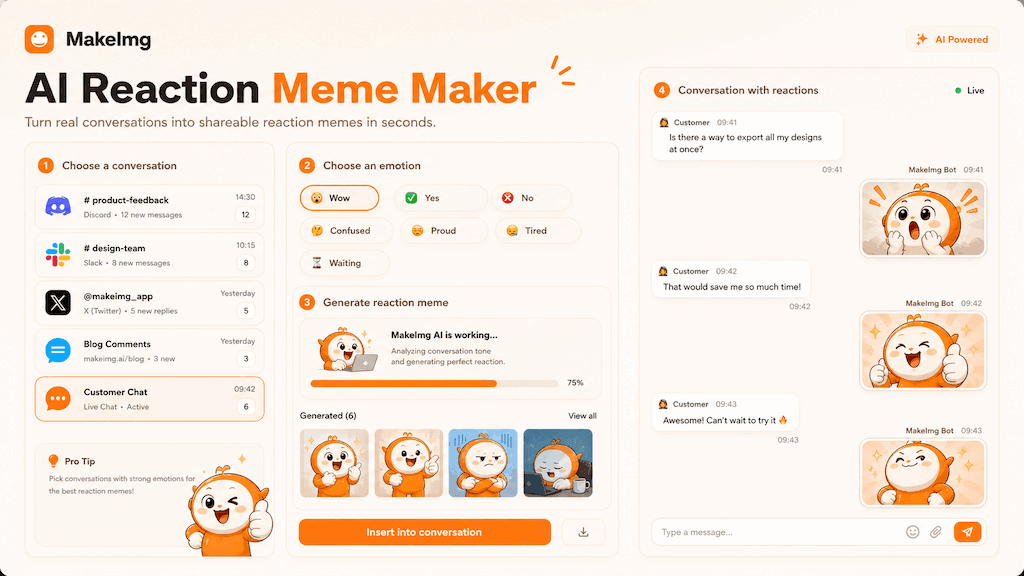
Use an AI reaction image generator to create reaction memes for chats, community replies, and social posts with consistent subjects and readable emotions.
Quick Answer
An AI reaction image generator creates visuals that express a specific feeling: surprise, approval, confusion, frustration, celebration, or disbelief. Instead of searching for a reaction image that roughly fits, you can generate a pack in a consistent style for your own community or brand voice.
The most effective reaction memes are simple. They have one clear subject, one clear emotion, and minimal background noise. That clarity matters because reaction images are often viewed quickly on mobile screens.
Step-by-Step Tutorial
Treat reaction generation like building a usable communication set.
- 1
Choose the reaction context
Decide where the images will be used: group chat, comments, Discord, support replies, or social posts. The platform affects image size and how bold the expression should be.
- 2
Pick a subject style
Use a mascot, avatar, self-owned photo, pet, or original character. Consistent subjects help the reaction set feel intentional instead of random.
- 3
Generate a balanced emotion set
Include positive, negative, and neutral reactions. A pack with only happy expressions is less useful in real conversations.
- 4
Keep text optional
Generate text-free images first. Add captions later when you know the exact language, joke, or platform requirement.
- 5
Save the best performers
Test the images in real conversations. Keep the reactions that people immediately understand and regenerate the ones that require explanation.
Best Use Cases
Reaction memes are strongest when they shorten a reply. A single image can replace a long explanation of excitement, confusion, or approval. This is useful for community managers, streamers, startup founders, and small teams that communicate in fast-moving channels.
They also help build identity. When a community repeatedly sees the same character reacting in different ways, the character becomes part of the shared language.
Prompt Suggestions
Use action and emotion together. A face alone may not be enough.
- Create an AI reaction meme pack with a cute original character, expressions for wow, nope, yes, confused, nervous, proud, tired, waiting, and celebrating.
- Generate chat reaction images in a clean sticker style, centered subject, simple background, bold facial expressions, no text.
- Make social media reaction memes for product updates: shipped it, bug found, customer loved it, waiting for review, big launch energy.
Quality Checklist Before You Generate
Meme quality is mostly about instant recognition. The subject should be readable before the viewer zooms in, and the emotion should be clear before any caption explains the joke. For a AI reaction image generator workflow, start by deciding what success looks like before you press generate. The output may be attractive, but it still needs to solve the original task: clearer restoration, a stronger reaction, a more natural composition, or a cleaner edit.
Check the input first. Make sure the source image, prompt, style choice, and final format all point in the same direction. If you are using MakeImg Create, keep the instruction short enough for the model to follow and specific enough that it cannot ignore the main request.
- One clear subject or task is easier to control than several competing goals.
- Simple backgrounds usually improve readability and reduce unwanted artifacts.
- Consistent style words help the model keep the result cohesive across a full set.
- Download only after checking the result at the size where it will actually be used.
Common Mistakes to Avoid
The most common mistake is asking for too much: too many styles, too many props, too many characters, or too much text inside the image. A meme pack becomes more useful when every panel has one job. This matters for SEO-style tutorial workflows too: people searching for AI reaction image generator usually want a usable result quickly, not a complex art experiment that needs many manual fixes afterward.
Before downloading, look at the full grid and ask whether each panel would work as a standalone reaction in a fast chat. If the answer is unclear, simplify the background and make the emotion stronger. If the first result is close but not ready, change one variable at a time. Edit the emotion list, simplify the style, clarify the reference roles, or narrow the edit instruction. Changing everything at once makes it hard to learn what improved the output.
Keep the original file and the generated result separate. That gives you a clean rollback point, makes comparison easier, and helps you regenerate later if you find a better prompt or model provider.
Publishing and Reuse Notes
After the output is ready, name the file in a way that matches the task, such as ai-reaction-meme-maker. Clear filenames make it easier to find the asset later, especially when you are testing several MakeImg workflows in the same week.
If you plan to publish the image publicly, review rights, privacy, and context before posting. Use source material you own or have permission to use, avoid misleading claims, and keep a copy of the prompt so you can explain or reproduce the creative process later.
- Save the final image and the source image in the same project folder.
- Keep a short note with the prompt, style, and tool path used for generation.
- Recheck the output on mobile because most meme and social images are consumed there.
FAQ
Short answers for reaction image planning.
How many reactions should I generate first?
Nine is a practical starting point. It gives enough emotional range without making review or download management difficult.
What style works best?
Sticker, comic, and anime-inspired styles usually read well at small sizes. Photorealistic reaction memes can work, but they need cleaner source images.
Can reaction memes be branded?
Yes. Use a mascot, color palette, or original character design. Keep branding subtle so the meme still feels like a natural reaction.
Create with MakeImg
Use this guide as a starting point, then try the matching MakeImg tool to generate, restore, compose, or edit your own images.
Open the tool