create 3x3 meme grid
How to Create a 3x3 Meme Grid and Reaction Pack
Learn how to create a 3x3 meme grid from a prompt or photo, keep the subject consistent, check weak panels, and download a usable reaction image pack.
Quick Answer
To create a useful 3x3 meme grid, start with one clear subject, plan nine visibly different reactions, and describe the layout and consistency rules in the prompt. Generate the set together, inspect every cell, and only then download the grid or individual reaction images.
A 3x3 grid is a nine-panel format, not the same thing as a three-panel horizontal meme. If you are looking for a 3 panel meme generator, state that layout explicitly. This guide focuses on a reusable nine-panel reaction pack for chats, social posts, and community replies.
What to Decide Before You Generate
The fastest way to get a usable grid is to make the decisions that the image model cannot safely infer. Treat the nine cells as a small vocabulary of reactions rather than nine unrelated prompts.
- Subject: one person, pet, mascot, or character that should remain recognizable in every cell.
- Reaction list: nine emotions or actions that cover different situations instead of repeating the same facial expression.
- Visual rules: one style, consistent outfit and colors, similar camera distance, and a simple background.
- Export goal: a complete preview grid, separate chat reactions, stickers, or a mixture of all three.
Step-by-Step Tutorial
The main goal is distinction. Each panel should earn its place in the grid.
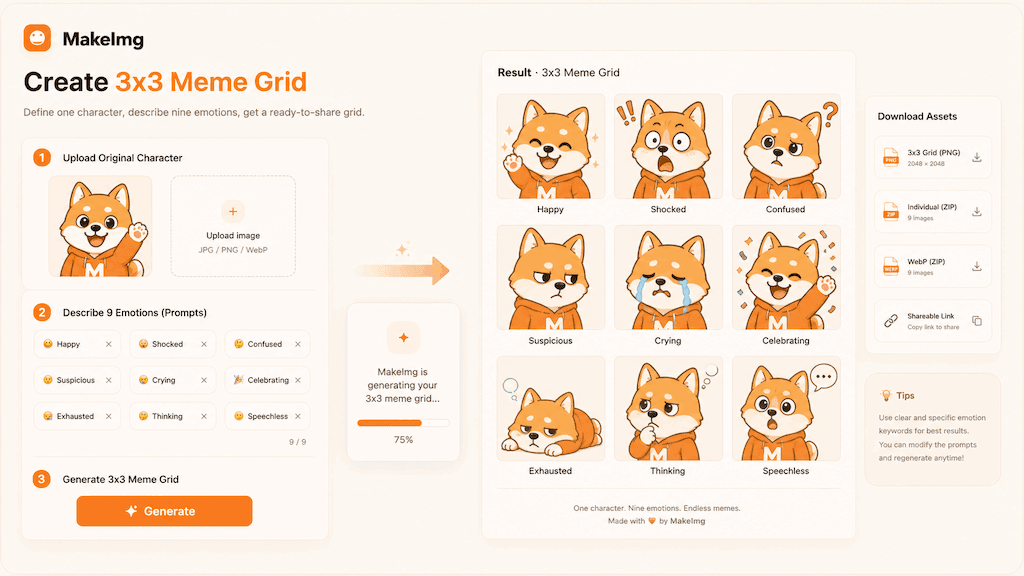
- 1
Choose a clear source
Start from a well-lit photo, mascot, avatar, or short character description. Avoid tiny faces, heavy filters, and crowded backgrounds because the model has less useful visual information to preserve.
- 2
Write nine distinct reactions
Cover different conversation needs: happy, shocked, confused, suspicious, crying, celebrating, exhausted, thinking, and speechless are easier to select later than nine variations of a smile.
- 3
Request a stable 3x3 layout
Ask for a 3x3 grid with the same character, outfit, palette, and camera distance. Add centered composition, visible margins, simple backgrounds, and no extra characters when you plan to crop the cells.
- 4
Inspect every cell
Check the grid at full size and as small thumbnails. Look for duplicate poses, missing cells, changed identity, cut-off faces, extra objects, and details that disappear when the panel is reduced.
- 5
Export for the actual use case
Keep the complete grid for a preview or social post. Download individual assets when you need separate reactions for chat, comments, stickers, or community moderation.
How to Check a Grid Before Downloading
Do not judge a grid only by the strongest cell. A reaction image grid is useful when most of the panels are distinct, recognizable, and easy to reuse. Use this short quality check before you save it:
- Count nine cells and make sure the boundaries are clear enough to crop.
- Compare the subject's face, clothing, colors, and proportions from cell to cell.
- Read each emotion without relying on a caption; the visual action should carry the reaction.
- Check the outer margins so a face, hand, or prop is not cut off in an individual export.
- Look for accidental text, watermarks, extra fingers, or unrelated characters before sharing.
Common Failure Modes
A polished-looking grid can still be difficult to use. These are the problems worth fixing instead of treating them as unavoidable model behavior.
- Repeated panels: replace a vague emotion with a visible action such as facepalm, cheering, sleeping, or running.
- Inconsistent identity: repeat the subject, outfit, palette, and camera distance; remove unnecessary scene changes.
- Hard-to-crop composition: request a centered subject, safe margins, and a simple background.
- Unreadable lettering: leave captions out of the first generation and add them in an editor afterward.
- Too many competing details: choose one primary subject and remove secondary objects that do not serve a reaction.
Prompt Template
Put the subject, panel list, visual rules, and layout in one prompt. This example is intentionally explicit so you can replace the character and reactions without losing the constraints:
- Create a 3x3 reaction image grid with one consistent character from the reference photo.
- Keep the same face, outfit, colors, and camera distance in every panel.
- Panels: happy, shocked, confused, suspicious, crying, celebrating, exhausted, thinking, speechless.
- Clean comic style, centered subject, simple background, visible margins, no extra characters, no text.
Quality Checklist Before You Generate
Meme quality is mostly about instant recognition. The subject should be readable before the viewer zooms in, and the emotion should be clear before any caption explains the joke. For a create 3x3 meme grid workflow, start by deciding what success looks like before you press generate. The output may be attractive, but it still needs to solve the original task: clearer restoration, a stronger reaction, a more natural composition, or a cleaner edit.
Check the input first. Make sure the source image, prompt, style choice, and final format all point in the same direction. If you are using MakeImg Create, keep the instruction short enough for the model to follow and specific enough that it cannot ignore the main request.
- One clear subject or task is easier to control than several competing goals.
- Simple backgrounds usually improve readability and reduce unwanted artifacts.
- Consistent style words help the model keep the result cohesive across a full set.
- Download only after checking the result at the size where it will actually be used.
Common Mistakes to Avoid
The most common mistake is asking for too much: too many styles, too many props, too many characters, or too much text inside the image. A meme pack becomes more useful when every panel has one job. This matters for SEO-style tutorial workflows too: people searching for create 3x3 meme grid usually want a usable result quickly, not a complex art experiment that needs many manual fixes afterward.
Before downloading, look at the full grid and ask whether each panel would work as a standalone reaction in a fast chat. If the answer is unclear, simplify the background and make the emotion stronger. If the first result is close but not ready, change one variable at a time. Edit the emotion list, simplify the style, clarify the reference roles, or narrow the edit instruction. Changing everything at once makes it hard to learn what improved the output.
Keep the original file and the generated result separate. That gives you a clean rollback point, makes comparison easier, and helps you regenerate later if you find a better prompt or model provider.
Publishing and Reuse Notes
After the output is ready, name the file in a way that matches the task, such as create-3x3-meme-grid. Clear filenames make it easier to find the asset later, especially when you are testing several MakeImg workflows in the same week.
If you plan to publish the image publicly, review rights, privacy, and context before posting. Use source material you own or have permission to use, avoid misleading claims, and keep a copy of the prompt so you can explain or reproduce the creative process later.
- Save the final image and the source image in the same project folder.
- Keep a short note with the prompt, style, and tool path used for generation.
- Recheck the output on mobile because most meme and social images are consumed there.
FAQ
A few practical questions about creating a nine-panel meme grid.
Is a 3x3 meme grid the same as a three-panel meme?
No. A 3x3 grid contains nine cells arranged in three rows and three columns. A three-panel meme usually means one row with three panels, so describe that layout separately if it is what you need.
Why do two panels look too similar?
Regenerate with stronger contrast between emotions, or replace one emotion with a physical reaction such as facepalm, cheering, sleeping, or running. Keep the other visual constraints unchanged.
Can I use a photo to create the reaction pack?
Yes. Use a clear image where the subject is visible, and only upload photos you have permission to use. Review the output before sharing because reference-based generation can change small details.
Should the grid include captions?
Usually no for the first pass. AI-generated text can vary between cells; adding captions after generation gives you better spelling, placement, and language control.
Create with MakeImg
Use this guide as a starting point, then try the matching MakeImg tool to generate, restore, compose, or edit your own images.
Open the tool